UTM Parameters for Email Campaigns: Naming Conventions and Examples
 By Kelly Or
Your email platform tells you how many people opened and clicked. It can’t tell you what those people did once they reached your site: which pages they read, whether they signed up, whether the top button or the footer link brought them. That second half lives in your analytics, and it only lines up with the email if the links carry UTM parameters.
This guide is the email-specific follow-up to our general UTM parameters guide. It covers what to put in each parameter for newsletters, promotions and automated emails, how to use utm_content to tell the links inside one email apart, how your email platform’s auto-tagging fits in, and what the numbers in GA4 do and don’t mean.
The Short Version
For a link in an email, a clean tag set looks like this:
https://example.com/spring-menu?utm_source=newsletter&utm_medium=email&utm_campaign=2026_09_spring_menu&utm_content=hero_button- utm_medium=email on every email link, always the same value.
- utm_source names which email program sent it:
newsletter,promo,welcome_series. - utm_campaign names this particular send or push.
- utm_content names the link’s position inside the email.
Google’s own campaign URL documentation uses the same pattern. Its example for an email is utm_source=summer-mailer, utm_medium=email, utm_campaign=summer-sale, and it recommends always setting source, medium and campaign.
Why utm_medium=email Matters in GA4
GA4 sorts sessions into default channels using fixed rules. According to Google’s default channel group definitions, a session lands in the Email channel when its source or medium is email, e-mail, e_mail or e mail. Those channel rules aren’t case sensitive and can’t be edited.
So utm_medium=email is what gets your newsletter traffic into the Email row of the Traffic acquisition report. A medium like newsletter or mailchimp won’t match that rule, and the sessions fall outside the Email channel. The channel rules ignore case, but campaign parameter values themselves are case sensitive: Google notes that utm_source=google and utm_source=Google are different values. Keep everything lowercase so your source and campaign rows don’t split.
Naming Conventions by Email Type
Pick one vocabulary, write it down, and reuse it for every send. Here’s a starting set that keeps utm_medium constant and uses utm_source for the email program:
| Email type | utm_source | utm_medium | utm_campaign | utm_content (examples) |
|---|---|---|---|---|
| Weekly or monthly newsletter | newsletter | email | 2026_09_newsletter | header_logo, feature_story, footer_link |
| One-off promotion | promo | email | 2026_09_autumn_sale | hero_button, product_grid, ps_link |
| Welcome series | welcome_series | email | welcome_email_2 | cta_button, text_link |
| Event invitation | event_invite | email | 2026_10_open_house | rsvp_button, map_link |
| Abandoned cart or re-engagement | cart_reminder | email | cart_reminder_1 | return_button, product_image |
| Transactional email (receipts, shipping) | transactional | email | order_confirmation | review_link, reorder_button |
A few conventions make this hold up over time:
- Date-prefix campaign names (
2026_09_...) so they sort chronologically in reports. - Name the campaign after the push, not the subject line. Subject lines change during A/B tests; the campaign doesn’t.
- Lowercase and underscores only. QRocket’s UTM link builder has two switches for this, Keep values lowercase and Replace spaces with underscores, both on by default.
- Don’t put personal data in the link. Adding a subscriber’s email address or name to a UTM value sends it to Google Analytics. Google’s policy says no personally identifiable information may be passed to Analytics, and that both the URL path and its parameters must be free of it.
Using utm_content to Compare Links Inside One Email
Most emails link to the same page more than once: a logo, a big button, a text link, a footer link. Without utm_content they all arrive in analytics as the same source, medium and campaign. Google’s documentation gives exactly this case as the reason utm_content exists: to differentiate creatives, “for example, if you have two call-to-action links within the same email message.”
Give every link a placement name, and keep those names consistent between sends: hero_button should mean the same spot in every newsletter. The QRocket builder’s help text says the same thing: utm_content “tells near-identical links apart — top_button vs footer_link.”
Where to find it in GA4. Google’s traffic-source reference lists utm_content under the Manual ad content dimensions, including Session manual ad content. It isn’t part of the default Session source / medium view. The dependable way to compare placements is an Exploration: add Session manual ad content as a row dimension, filter to Session medium = email and the campaign you want, and use sessions or your key events as the values.
If Your Email Platform Adds UTMs Automatically
Many email service providers can tag links for you, and mixing their tags with your own is the most common way email reports end up confused.
- Mailchimp has a Google Analytics tracking option in each email’s Settings & Tracking section. Its UTM values can be edited per email or reset to defaults. Mailchimp’s help warns that combining its Google Analytics tracking with your own custom UTM tracking “could skew results in reports” and recommends choosing one.
- Klaviyo always adds
utm_sourceandutm_medium, and can optionally addutm_campaign,utm_idandutm_term. Since June 2, 2025, the defaultutm_mediumis the message type, so email links carryutm_medium=email. Accounts that saved custom UTM settings before that date keep their old values.
Decide on one approach per platform. If you use the ESP’s auto-tagging, check its values against your naming table and edit them to match. If you tag manually, turn auto-tagging off so it doesn’t add or override parameters. Either way, click a link in a test send and look at the address bar before the real send.
Build the Links in Four Steps
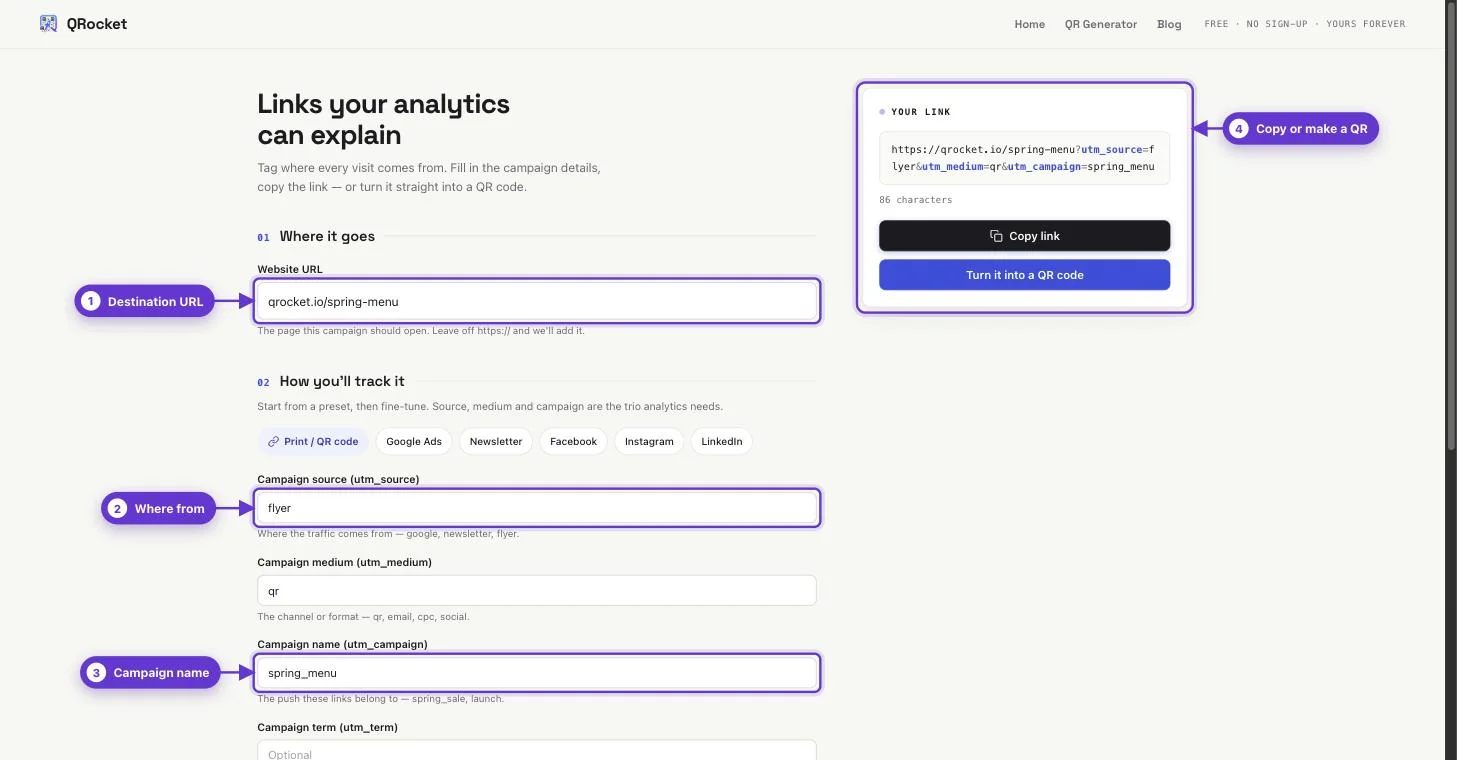
- Open the free UTM link builder and paste the landing page URL: the specific page the email points to, not just your homepage.
- Pick the Newsletter preset or fill in the fields. The preset sets
utm_source=newsletterandutm_medium=email. Add your campaign name, and autm_contentvalue for this link’s placement. - Copy the finished link into your email editor, then change only
utm_contentfor each other link in the same email. - Send yourself a test, click each link, and confirm the parameters survive the ESP’s click tracking and any redirects.
Tag every link in your next newsletter the same way, in under a minute. — Open the Free UTM Link Builder
What the Numbers Mean (and Don’t)
Be precise about what each system counts, because the numbers won’t match.
- Opens and clicks are counted by your email platform. GA4 doesn’t see opens at all.
- Sessions are counted by GA4 when someone lands on your site and your Analytics tag runs. A click in the ESP isn’t guaranteed to become a GA4 session. The visitor may leave before the page loads, decline analytics consent, or use a blocker.
- Key events (sign-ups, purchases) appear in the Traffic acquisition report against the source, medium and campaign of the session they happened in.
So read ESP clicks and GA4 sessions as two different measurements of the same send, not as one number that should reconcile. The useful comparisons are within one system: which campaign, which email type, which utm_content placement produced more sessions and key events. Our guide to tracking QR code scans makes the same distinction for print: a session is a visit your analytics recorded, not a scan.
Email and Print in the Same Campaign
If a campaign runs in both the inbox and on paper, say a newsletter plus a flyer with a QR code, keep the same utm_campaign value and let the medium separate the channels: utm_medium=email for the newsletter, utm_medium=qr for the printed code. Then one campaign filter shows both, and the medium tells you which one worked.
The link builder can hand a tagged link straight to the QR code generator, so the printed code carries the same campaign name as the email. Our QR code marketing strategy guide covers how to plan multi-channel campaigns like this.
Consistent Tags, Readable Reports
Email UTMs don’t need to be clever. They need to be the same every time: email as the medium, a short list of sources, dated campaign names, and a placement in utm_content. Set the convention once, check your ESP isn’t adding a second set of tags, and build each link in QRocket’s free builder so the formatting takes care of itself.
Frequently Asked Questions
What UTM parameters should I use for email?
Use utm_medium=email on every email link, utm_source for the email program (such as newsletter or promo), utm_campaign for the specific send, and utm_content for the link’s position in the email. Keep all values lowercase with underscores so reports don’t split one value into several rows.
What should utm_source be for a newsletter?
A short, stable name for the program, such as newsletter. Keep the channel type in utm_medium=email and the specific send in utm_campaign. Some teams use the email platform’s name as the source instead; either works if you use it consistently.
How do I use utm_content in an email?
Give each link in the email its own placement value, such as hero_button, text_link or footer_link, while keeping source, medium and campaign the same. In GA4 the values appear in the Session manual ad content dimension, which you can add to an Exploration to compare placements.
Why is my email traffic not showing in the Email channel in GA4?
GA4’s Email channel requires the source or medium to be email, e-mail, e_mail or e mail. A medium such as newsletter doesn’t match, so those sessions land in another channel. Untagged email links have no campaign data at all, so their visits can end up under Direct or Referral instead, depending on the email client.
Does Mailchimp add UTM parameters automatically?
Mailchimp can, through its Google Analytics tracking option in each email’s Settings & Tracking. You can edit the values per email. Mailchimp recommends not combining that tracking with your own custom UTM tags, because using both can skew reports.
Do UTM parameters track email opens?
No. Opens are measured by your email platform. UTM parameters only describe a visit once someone clicks through and your analytics records a session on your site. Expect the email platform’s click count and GA4’s session count to differ.
Create a free QR code with custom colors, your logo and print-ready downloads — no sign-up.