QR Code vs Barcode: What's the Difference?
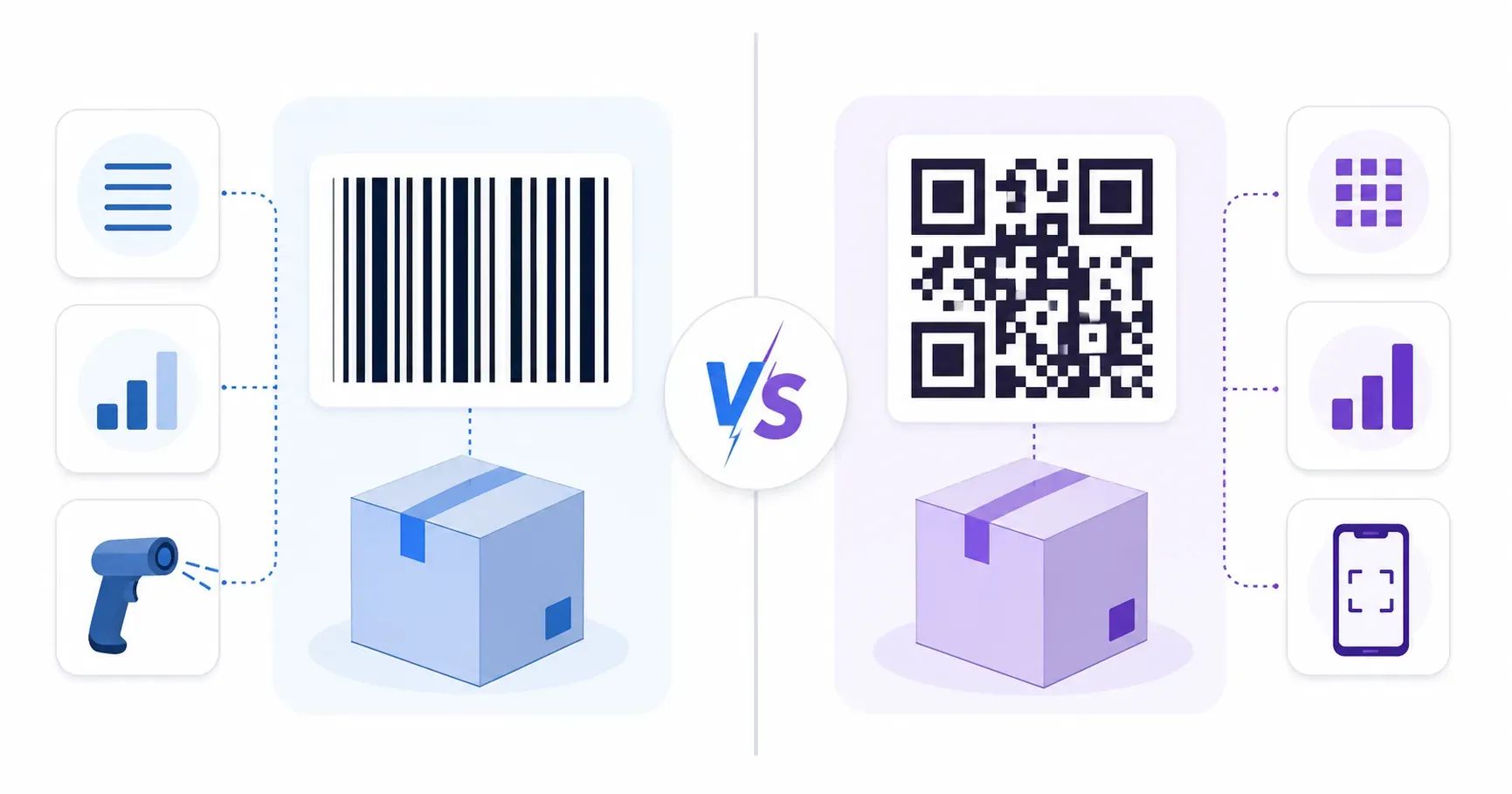
Both are black-and-white patterns of machine-readable ink, both sit on the packaging in your kitchen right now, and both get scanned millions of times a day — yet a barcode and a QR code are built on completely different ideas. The barcode stores a short number in a row of stripes. The QR code stores thousands of characters in a grid. That structural gap drives every practical difference in the QR code vs barcode question: how much data each holds, what hardware reads it, how much damage it survives, and where retail is heading next. This guide compares them head to head and ends with the shift most shoppers haven’t heard about yet — GS1’s Sunrise 2027 push to bring 2D codes to the checkout lane.
Barcodes in 30 Seconds: The 1D Original
The stripes on a cereal box are a one-dimensional (1D) barcode: data encoded in the varying widths of vertical bars and the gaps between them, read left to right in a single line. That’s the whole design. It stores a short identifier and nothing more.
The familiar retail barcode is a UPC (Universal Product Code) or EAN (European Article Number), holding just 12 to 13 digits — enough for a product number a database turns into a name and price. Code 128 is more flexible and encodes letters and symbols, but stays practical only up to roughly 80 characters before it gets impractically wide.
Barcodes were built for one job: speed at the checkout. The first UPC barcode was scanned in 1974 on a pack of Wrigley’s gum, and the format has run global retail ever since. It is simple, cheap, and everywhere — and for a fixed-lane register, still hard to beat.
QR Codes in 30 Seconds: The 2D Upgrade
Turn the data 90 degrees and add a second axis, and you get a two-dimensional (2D) code. A QR code (Quick Response code) stores information in a grid of small squares called modules, encoding data both horizontally and vertically at once. That extra dimension is where all its capacity comes from.
Invented in 1994 by the Japanese company Denso Wave to track automotive parts faster than a barcode could, the QR code was built to hold far more data and read quickly from any angle. For a full primer on the grid, finder patterns, and encoding, see what is a QR code. The short version: a 2D barcode packs orders of magnitude more into the same footprint, and any smartphone camera reads it.
QR Code vs Barcode: Key Differences at a Glance
Before the deep dives, here is the whole comparison in one view. This table captures the difference between a QR code and a barcode across the dimensions that actually affect a buying or design decision.
| Feature | Barcode (1D) | QR Code (2D) |
|---|---|---|
| Structure | Vertical stripes, one dimension | Module grid, two dimensions |
| Data capacity | ~12–80 characters | Up to 7,089 numeric characters |
| Scan angle | Must be aligned | Omnidirectional (360°) |
| Reader hardware | Laser scanner or imager | Any smartphone camera |
| Damage tolerance | Near zero — one broken bar fails | Up to 30% with error correction |
| Cost to create | Free | Free |
| Typical job | Retail checkout, inventory ID | Links, menus, payments, product data |
The pattern in the 1D vs 2D barcode debate is consistent: the barcode is a specialist tuned for one high-speed task, while the QR code is a generalist that trades a little checkout speed for enormous flexibility. Note the cost row — both are free to make, a UPC from a retail system and a QR code from a free tool like QRocket. QR codes also come in several content types, and the types of QR codes explained guide covers what a single 2D code can carry.
QR Code vs Barcode: Data Capacity Compared
This is the difference that drives everything else. A standard retail barcode holds a 12-digit product number. A single QR code holds up to 7,089 numeric characters — or about 4,296 letters and symbols. That is not a small edge; it is a different category of storage.
Picture a jar of pasta sauce. The barcode encodes one thing: the product ID that the register looks up. A QR code on the same jar could carry the product ID, the batch number, the expiry date, cooking instructions, and a link to the recipe page — all in one scan. The barcode points to data stored elsewhere; the QR code can be the data.
Key takeaway: A barcode identifies a product. A QR code can describe it — ID, batch, expiry, and a web link in a single grid. That capacity gap is the reason retail is migrating, because brands and regulators increasingly want traceability data on the pack itself.
Seen what 2D can hold? Make your own QR code free and test it. — Create Your Free QR Code
Scanning: Angle, Speed, and Hardware
Wave a boxed product at a supermarket scanner and you instinctively line the stripes up with the beam. You have to — a 1D barcode must be read across the bars, roughly aligned, in a single pass. Tilt it too far and the laser misses.
A QR code has no such requirement. Its three corner “finder” squares let a scanner locate and orient the code from any rotation, so it reads omnidirectionally — a full 360 degrees. Point a phone at it upside down and it still works. That, plus the fact that the reader is a camera nearly everyone already carries, is the QR code’s decisive practical advantage outside the checkout.
The barcode wins on one axis: raw speed at a fixed station. A laser scanner reads a UPC in milliseconds, over and over, faster than a camera focusing on a QR grid — which is exactly why the checkout lane is the last place barcodes hold their ground.
Damage Tolerance and Durability
Scratch out part of a barcode and it usually dies. Because the data runs in one continuous line, a single severed bar or a smudge across the stripes can break the read entirely — there is no backup copy of the missing information.
QR codes were built to survive damage. They use Reed-Solomon error correction, which bakes redundant copies of the data throughout the grid, so a code can still scan with up to 30% of its pattern dirty, torn, or covered. That is what lets a QR code work with a logo in the middle or a coffee ring across one corner. The mechanics of how that reconstruction works — and the four correction levels you can choose — are covered in QR code error correction.
In durability terms, the gap is stark: a barcode must stay clean along its whole length, while a QR code shrugs off real-world wear. For labels handled, weathered, or scuffed in a warehouse, that resilience is a genuine operational advantage.
When a Barcode Is Still the Right Choice
For all its limits, the barcode isn’t going away — and pretending it should is where a lot of comparisons lose credibility. There are real jobs where 1D still wins.
- Legacy POS infrastructure. Millions of retail lanes run laser scanners and point-of-sale systems built around UPC. Replacing that hardware and software is slow and expensive, so barcodes remain the default at checkout for now.
- Tiny label space. On a slim pharmaceutical vial or a small electronic component, there may not be room for a QR grid with its required quiet-zone margin. A thin barcode fits where a 2D code can’t.
- Ultra-high-speed conveyor scanning. In sorting facilities where packages fly past fixed laser scanners, the barcode’s instant single-line read still outpaces camera-based imaging for sheer throughput.
The honest takeaway in the barcode vs QR code decision: match the code to the job. High-volume fixed-lane scanning favors the barcode; everything involving rich data, phone scanning, or damage resistance favors the QR code.
GS1 Sunrise 2027: Retail’s Shift to 2D Codes
Here is the development that will quietly reshape the packaging in every store. GS1, the organization that maintains the global barcode standard, is leading an initiative called Sunrise 2027 — a push for retail point-of-sale systems worldwide to be able to scan 2D codes like QR at the register by the end of 2027.
The goal is a transition, not an overnight switch. During the changeover, many products will carry both a traditional barcode and a 2D code, letting older scanners keep working while newer ones read the richer data. Once checkouts can process 2D codes, a single QR-style code on a package can handle the price lookup and carry batch numbers, expiry dates, and a link to product information — collapsing several labels into one.
For merchants, the thing to watch is POS readiness: whether your scanning hardware can already accept 2D codes, and when suppliers plan to add them. The full transition — including the GS1 Digital Link format behind it — deserves its own deep dive. For now, the headline is simple: the format you scan for a menu today is the one retail is preparing to adopt at the till. Creating a QR code for a product page or menu is free with QRocket, so there’s no cost to experiment ahead of the shift.
The Format That Grew a Second Dimension
Strip away the specs and the story is about dimensions. The barcode solved 1974’s problem — get a price to the register fast — with a single line of data, and it still does that one job beautifully. The QR code answered a bigger question by adding a second axis, and that extra dimension is why it now carries links, menus, payments, and soon your grocery receipt’s worth of product data. Retail is moving to 2D on a deadline. Generate a free QR code with QRocket for your product page or storefront today and you’re already speaking the format the checkout lane is learning to read.
Frequently Asked Questions
What’s the main difference between a QR code and a barcode?
Dimensions. A traditional barcode stores a short identifier — around 12 digits — in a single line of stripes. A QR code stores data in a two-dimensional grid, holding up to 7,089 characters. That structural difference gives the QR code vastly more capacity and lets it be read from any angle.
Can a QR code replace a barcode?
Increasingly, yes. QR codes hold far more data, scan from any angle with an ordinary phone, and survive damage a barcode can’t. Retail’s GS1 Sunrise 2027 initiative is preparing point-of-sale systems to accept 2D codes, which will let one QR code do a barcode’s job and much more.
Why do stores still use barcodes?
Installed hardware and habit. Millions of checkout lanes run laser scanners and software built around 1D barcodes, and that infrastructure reads them extremely fast. Very small labels also sometimes lack room for a QR grid. Until systems upgrade, barcodes remain the fastest option at a fixed register.
Which is more durable?
QR codes, clearly. Built-in error correction lets them scan even with up to 30% of the pattern damaged, dirty, or covered. A barcode has no such redundancy — a single broken or smudged bar can defeat the whole scan. That resilience matters for labels exposed to handling and wear.
What is GS1 Sunrise 2027?
A global retail initiative led by GS1 for point-of-sale systems to be able to scan 2D codes — like QR codes — by the end of 2027. It sets the stage for products to carry richer, traceable data at checkout, alongside and eventually instead of the traditional UPC barcode.
Create a free QR code with custom colors, your logo and print-ready downloads — no sign-up.